
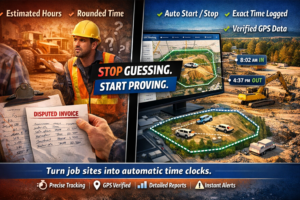
You’re standing in front of a client who swears the crew only spent four hours on-site. Your foreman says it was six. Your timesheet says five, but it was estimated from memory three days later.
No one’s lying. Everyone’s just approximating.
This is the real problem with job site time tracking: your billing is only as accurate as your tracking method – and manual estimates aren’t tracking at all. They’re guessing.
When a dispute hits, you need more than a driver’s word or a handwritten timesheet. You need proof. Timestamped, location-verified, undeniable proof.
Rastrac geofencing transforms job site boundaries into automatic time clocks. The moment a vehicle or piece of equipment enters a geofence you’ve drawn around a job site; the system logs the exact arrival time. When it leaves, the system logs the exact departure time. No manual entry. No rounding. No gray area.
For construction companies, equipment rental operations, and field service providers, this shifts the entire economics of job site billing from dispute-prone estimates to data-backed invoices that clients can’t argue with.
Geofencing is Rastrac’s most powerful feature for time-based billing. Here’s how it works in practice.
First, you define the job site boundary. Open the Rastrac dashboard, select your job site address or draw a polygon around the property perimeter, and activate the geofence. You can customize the geofence shape to match the exact job site footprint – including irregularly-shaped properties, multi-building campuses, or just a specific portion of a larger facility.
Once the geofence is active, every tracked asset knows it’s entered a monitored area.
Here’s where manual timesheets disappear. When a vehicle or piece of equipment equipped with a Rastrac GPS tracker crosses the geofence boundary, the system records:
When the asset exits the geofence, the system logs:
No one has to remember to punch in. No one writes anything down. The GPS does the work.
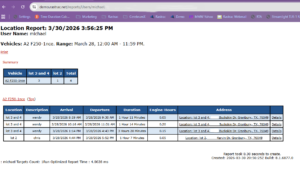
The Rastrac platform generates a Geofence Visit Report that lists every entry and exit at every job site. You can filter by vehicle, driver, date range, or specific geofence. The report shows:
For construction crews or equipment rental companies that bill by the hour, this report becomes your invoice foundation. You’re not estimating anymore – you’re documenting.
If a client disputes the hours, you show them the GPS data. Conversation over.
Most companies underestimate how much money leaks out through manual time tracking.
Foremen estimate crew arrival at “around 8:15” and departure at “roughly 3:45.” That’s a loose 7.5 hours. But the GPS shows 7 hours 23 minutes. Or 8 hours 12 minutes.
When you’re billing 20 crews across 50 job sites per month, those “rough estimates” compound. Underestimating costs you direct revenue. Overestimating triggers client disputes that erode trust and create payment delays.
Every billing dispute costs time:
Construction companies spend an average of 2-4 hours per month resolving time disputes alone. GPS-backed data eliminates that entirely.
Many field service companies discover something unexpected when they start tracking job site time: assets are arriving later or leaving earlier than expected, eating into billable hours without anyone realizing it.
Travel time between job sites, coffee breaks, material runs, waiting for inspectors – these all eat into the clock. When you see it in the data, you can optimize routes, stagger schedules, or adjust your bidding model.
Rastrac customers report recovering $3,000-$5,000 per tracked asset annually through improved billing accuracy, reduced disputes, and optimized scheduling.
Challenge: You bid jobs at $X per crew-hour. But crews get there “around 7 AM” and leave “before 5 PM.” Your estimate is 10 hours. The actual work is 9 hours 15 minutes on some days, 10 hours 45 minutes on others.
GPS Solution:
GPS Solution:
Challenge: Your HVAC or electrical crews hit 4-6 job sites per day. Each one should bill 30 minutes to 2 hours depending on the scope. How do you track which crew was where and for how long?
GPS Solution:
Here’s the moment that matters most: when a client challenges your invoice.
With manual timesheets:
With Rastrac GPS geofencing:
This is especially powerful for equipment rental operations and construction companies working with cost-conscious contractors or facility managers who scrutinize every invoice.
Q: Can we set up geofences for multiple job sites at once?
A: Yes. Rastrac allows unlimited geofences. You can create geofences for every active job site and manage them all from one dashboard. Filter reports by geofence to see time on-site for any specific location.
Q: What if a crew forgets to tell us they’re going to a job site? Will the geofence still track them?
A: Absolutely. The geofence doesn’t depend on manual check-in. As soon as the GPS-equipped vehicle crosses the boundary, the entry is logged. This is actually helpful because it catches unexpected arrivals or after-hours site visits you might otherwise miss.
Q: How do we know the GPS coordinates are accurate?
A: Standard GPS accuracy is within 100 meters. For job site boundaries (which are typically larger than 100 meters), this is more than sufficient. The geofence timestamp is what matters for billing – the system records the exact second the vehicle enters and exits the defined boundary.
Q: Can we integrate geofence data with our invoicing system?
A: Rastrac provides API access and data export in Excel, CSV, PDF, and other formats. Many customers export the Geofence Visit Report and import it directly into their billing software. Rastrac’s development team can also help with custom integrations.
Q: What if a vehicle sits idle inside a geofence for hours?
A: The geofence logs entry and exit, not idle time. So, if a crew arrives at 8 AM and leaves at 5 PM, that’s 9 hours billable even if they spent 2 of those hours waiting for materials. If you want to bill based on actual work time (when the vehicle or equipment is running), you can pair geofence data with engine-hour reports or idle-time alerts.
H2 Stop Leaving Money on the Table – Prove Your Hours
Billing disputes don’t just cost you money – they damage client relationships and tie up your team. When you back every invoice with GPS data, disputes disappear.
Rastrac geofencing turns job site boundaries into automatic time clocks. No manual entry. No estimates. No arguments. Just timestamped, location-verified proof that your crew was on-site for the hours you’re billing.
For construction companies, equipment rental operations, and field service providers, this translates to recovered revenue, faster payment, and the confidence to bid confidently knowing your actual on-site time will match your invoice.